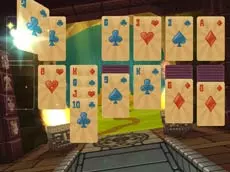
3D Solitaire
3D Solitaire brings the classic card game into a three-dimensional space, offering a fresh perspective on traditional Klondike rules with full camera control for an immersive experience.
About 3D Solitaire
This digital adaptation of the popular card game takes the familiar logic of Solitaire and places it within a dynamic 3D environment. Players can view the tableau from multiple angles, providing a modern twist on a timeless puzzle format. Developed by Famobi, the game emphasizes clean visuals and smooth interaction, making it accessible for both casual players and card game enthusiasts looking for a refined tabletop feel.
The gameplay centers on sorting cards into specific sequences and suits. What sets this version apart is the ability to manipulate the viewpoint, allowing you to adjust your perspective as you work through the deck. Whether you are playing on a desktop or a mobile device, the interface remains intuitive, focusing on the core strategic elements that make Solitaire a staple of the logic genre.
Why players like 3D Solitaire
- Unique 3D perspective adds a modern layer to the classic tabletop feel.
- Full camera rotation and movement allow for a completely customized viewing experience.
- Clean and minimalist design focuses on clear card visibility and logic.
- Responsive controls optimized for both mouse and touch-based gameplay.
Instructions
 = choose cards
 = move camera
Q/E = rotate camera
How to play
Select and move cards using the mouse or touch controls to build sequences in descending order and alternating colors. The primary objective is to organize all cards into foundation piles by suit. Use the WASD keys or Q and E to rotate the camera, giving you a better view of the layout. Re-evaluating the board from a different angle can help reveal moves you might have missed from a flat perspective.
Tips for beginners
- Rotate the camera frequently to find the most comfortable viewing angle for the current layout.
- Adjust the camera position to see the suits and numbers more clearly if the default view is too distant.
- Prioritize uncovering face-down cards in the tableau to increase your available move options.