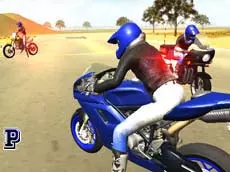
3D Moto Simulator 2
3D Moto Simulator 2 offers a realistic motorcycle riding experience where you can explore open environments, switch between different bikes, and test your driving skills with high-speed maneuvers.
About 3D Moto Simulator 2
This driving simulator focuses on the freedom of motorcycling across expansive 3D landscapes. Players can choose from a selection of distinct bikes, ranging from street racers to police motorcycles, each offering a different feel on the road. The emphasis is on exploration and mechanical control rather than structured racing, allowing for a relaxed or high-energy riding session depending on your personal preference.
The game utilizes a physics engine to simulate bike handling, including gear shifting and braking. With features like multiple camera angles and functional police lights, it caters to fans of simulation games who enjoy technical driving. Whether you are testing the limits of the turbo boost or cruising through the city, the open-world design provides ample space to experiment with the different vehicles.
- Genre: Driving, 3D
- Platform: Browser
- Mode: Singleplayer
- Developer: Faramel Games
- Mobile support: No
- Release: 08/26/2016
Why players like 3D Moto Simulator 2
- Instant access to a selection of different motorcycles.
- Open-world environments designed for free exploration.
- Technical features like manual gear shifting and turbo boosts.
- Multiple camera perspectives for a customized riding view.
- Interactive elements including functional police sirens and lights.
Instructions
 = ride
123 = change bike
SHIFT = turbo
C = change view
SPACE = handbrake
R = reset game
G = reset bike
E = police lights
H = hide instructions
PGUP/PGDN = change gear
How to play
Navigate your motorcycle using the arrow keys and use the shift key for a speed boost. You can instantly swap between three different bikes using the number keys to see how each handles. Use the spacebar for the handbrake to manage tight turns or sudden stops. If you get stuck or flip over, use the reset keys to quickly get back on the road and continue your ride.
Tips for beginners
- Switch camera views to find the best perspective for high-speed maneuvering.
- Use the handbrake in combination with steering for sharper cornering.
- Experiment with manual gear changes to better control your acceleration and torque.
- Activate the turbo boost on long straightaways to reach maximum velocity quickly.